2021-09-30 Note: ShareMetric is currently hidden from the Chrome Extension marketplace while we update some of the code to reflect new privacy requirements. Unfortunately, we do not have a timeline for it to get restored - Buzzsumo's toolbar is a good replacement in the meantime.
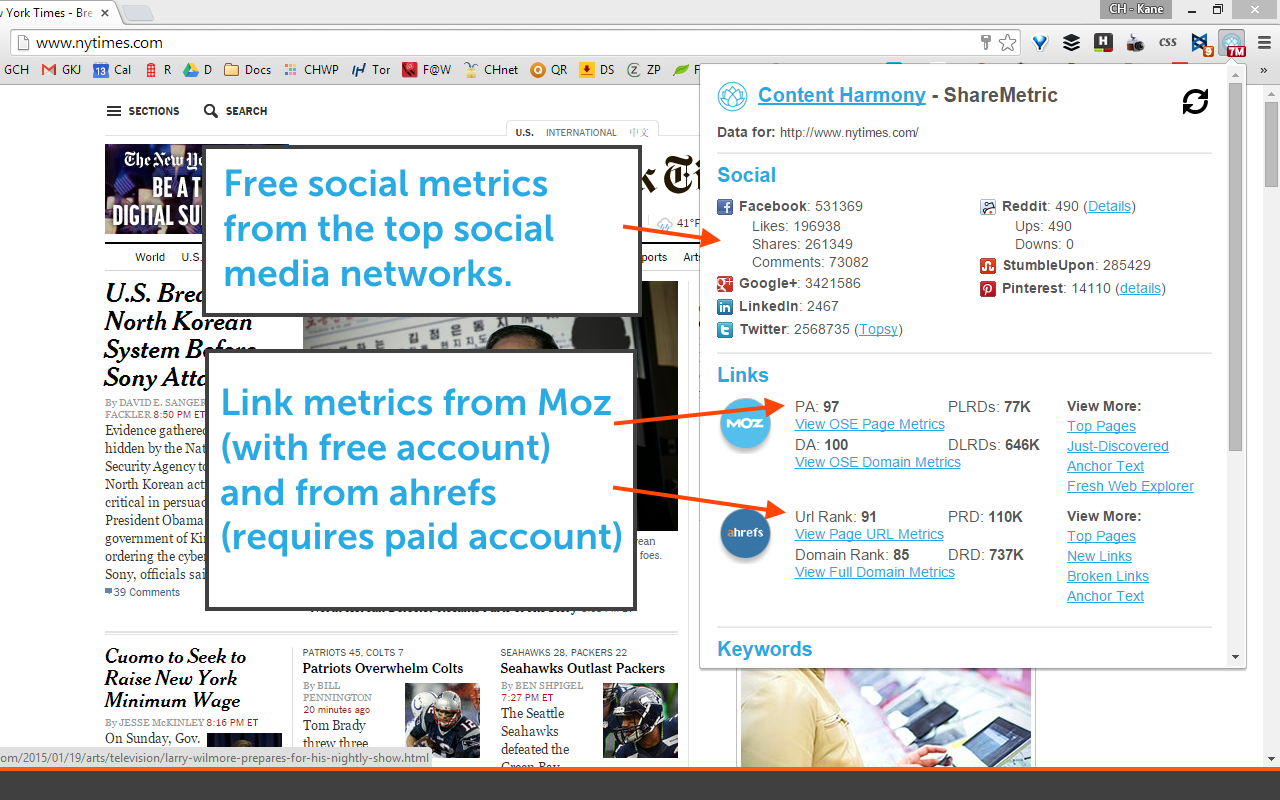
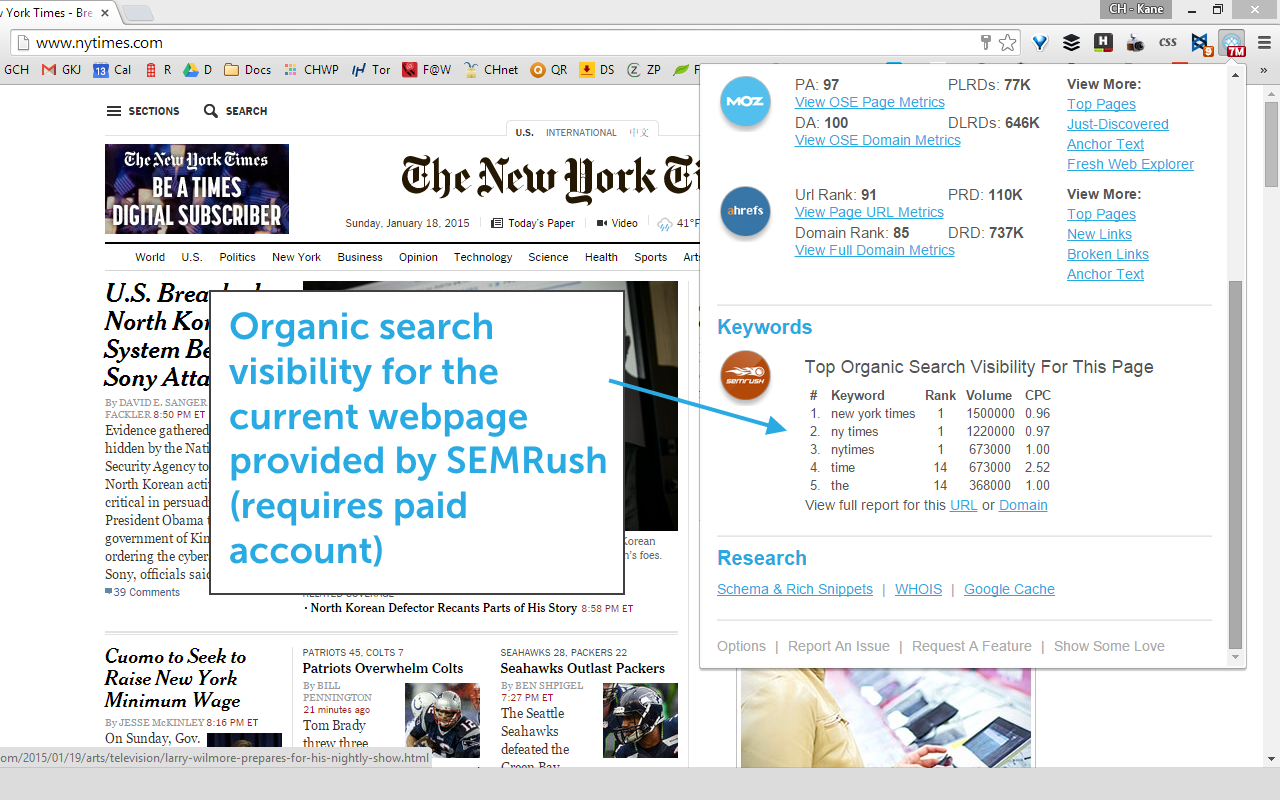
ShareMetric Chrome Extension is a tool built by Content Harmony to display social shares, incoming link metrics, and organic search visibility in your Chrome browser.
Update Aug 22, 2016: Facebook API Shutting Down:
- Much like Twitter one year ago, Facebook has shut down their API to the public to grab share counts (so much for the Open Graph). We have turned off Facebook functionality by default. We also have made some updates to Ahrefs functionality to fix broken links.
Update Oct 5, 2015: Twitter API Shutting Down:
- Twitter recently announced that their share count API would be shut down at some point in October. We expect that we’ll no longer be able to pull Twitter share count data into ShareMetric. We will, however, replace the share count number with a link to Twitter search results for the current URL.
Update Jan 18, 2015: ShareMetric 2.1.0 Released:
- Improved support for Pinterest
- Link Data from Moz & ahrefs
- Organic search visibility data from SEMRush
- Refactored extension to run faster
Subscribe to our newsletter if you want to be updated when we release ShareMetric!
Add to Chrome:
To add ShareMetric to your browser, head over to the official ShareMetric listing in the Chrome Extensions Library.
Screenshot:
Here’s a preview of the drop down being used at www.Google.com:
Setup Video:
This is an old setup video – we’ll upload a new one someday:
FAQ:
Q – Sometimes the plugin reports “0” shares for a URL that definitely has been shared.
A – First, try clicking the refresh button. If the metrics still come back at 0, make sure the URL doesn’t have funny parameters or id tags. URL variations like “?s=18” or “#referral” are sent to APIs exactly as-is, and these services will report metrics for that exact URL instead of the normal page URL. We have also seen this occur on sites that have incorrect canonicals set up on the site.
Q – Sometimes the plugin reports “-1” for certain metrics.
A – Give it a couple more seconds, and refresh if it’s still there. This often happens on ahrefs while the metrics are still being returned.
Q – How do I enable link and search metrics from Moz, Ahrefs, and SEMRush?
A – First you’ll need version ShareMetric 2.0 or greater installed. Then, you will need to be a paid subscriber to each of these services to enable those features – then you will need to get your API key information and enter it into the ShareMetric Options page. We do not track this information – it is stored in your browser.
Request Features or Provide Feedback:
Please fill out our contact form.
Show Some Love:
Want to say thanks for providing this plugin for free? We appreciate it! We’d love it if you would do any of the following:
- Write a blog post about ShareMetric and how you use it.
- Link to this page from your website.
Acknowledgments:
ShareMetric was produced by Kane Jamison and Graeme Britz.
Disclaimer & Privacy Policy:
By using ShareMetric you recognize and agree to the following:
- This tool is provided free of use and has been tested by numerous beta testers but may occasionally have errors – we’re not responsible for anything that happens to your browser while using the extension. Use at your own risk.
- We track IP address for all queries to ensure our servers are used at appropriate volumes per user.
- We track domains of the URLs requested by your browser for support purposes. For example, sometimes a single website like gmail.com can cause lots of timeout errors, and we make plugin changes to stop tracking on those domains.
- We do not track SSL or https URLs, however, those URLs are sent to APIs like Facebook, Twitter, Moz, SEMRush, etc. in order to pull metrics for those pages. If you prefer that URLs are only sent to our servers and these 3rd party services when you actually click the Chrome extension, then you’ll want to switch your ShareMetric settings to “Check share counts when icon is clicked” instead of “Check share counts on page load.”