Try our Strikethrough & Underline Text Generator, too. =)
How Does Our Bold and Italic Text Generator Work?
Our tool leverages advanced Unicode characters to magically transform the text you input into a variety of styles. With a simple click, you can give your text a new flair with options such as:
- Bold = 𝗕𝗼𝗹𝗱
- Italic = 𝘐𝘵𝘢𝘭𝘪𝘤
- Bold Italic = 𝘽𝙤𝙡𝙙 𝙄𝙩𝙖𝙡𝙞𝙘
Just paste your text, choose your preferred style, and witness the instant makeover!
Social Media Examples
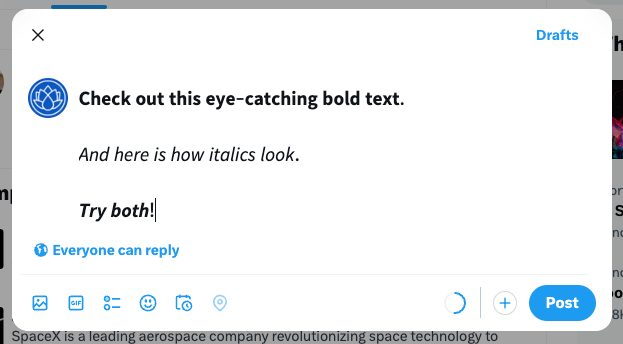
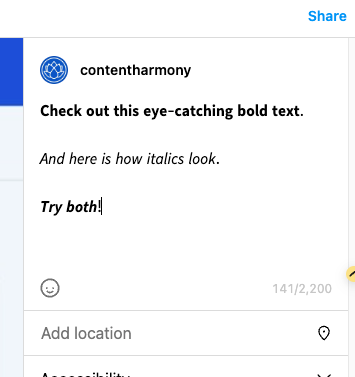
See the impact of our text transformations across popular social platforms:
X / Twitter Bold and Italic Text
Instagram Bold and Italic Text
LinkedIn Bold and Italic Text
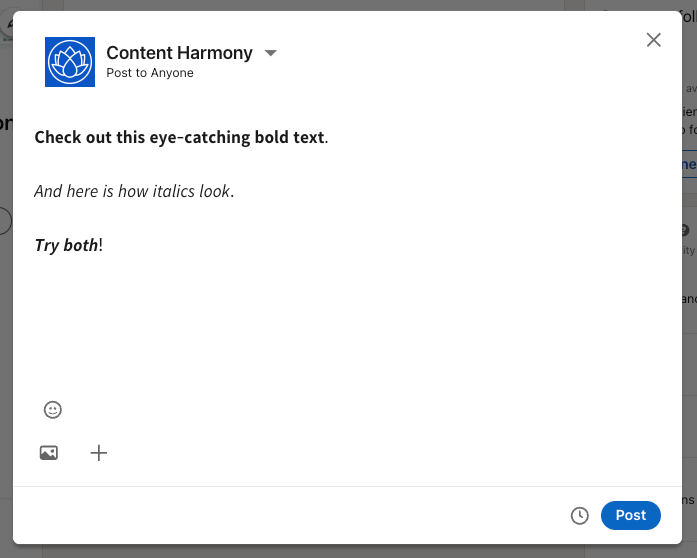
This also works great in Slack, Discord, etc.
Understanding Unicode and Text Styling
Unicode sets the foundation for text representation across various systems, enabling a vast array of writing systems to be used online. It includes special characters for styling, such as bold and italic, which our tool uses to create visually distinct text without altering the font itself. Here's how it works for different styles:
- Bold: By employing specific bold characters from Unicode, we can make any text appear bolded.
- Italic: Utilizes Unicode's italic characters to slant your text artistically.
- Bold Italic: Combines both bold and italic characters for a pronounced effect.
Supported Characters
We support lower and uppercase letters and numbers. Here's a formatted table if you'd like to just copy and paste any of them:
Bold Characters:
𝗔𝗕𝗖𝗗𝗘𝗙𝗚𝗛𝗜𝗝𝗞𝗟𝗠𝗡𝗢𝗣𝗤𝗥𝗦𝗧𝗨𝗩𝗪𝗫𝗬𝗭
𝗮𝗯𝗰𝗱𝗲𝗳𝗴𝗵𝗶𝗷𝗸𝗹𝗺𝗻𝗼𝗽𝗾𝗿𝘀𝘁𝘂𝘃𝘄𝘅𝘆𝘇
𝟭𝟮𝟯𝟰𝟱𝟲𝟳𝟴𝟵𝟬
Italic Characters:
𝘈𝘉𝘊𝘋𝘌𝘍𝘎𝘏𝘐𝘑𝘒𝘓𝘔𝘕𝘖𝘗𝘘𝘙𝘚𝘛𝘜𝘝𝘞𝘟𝘠𝘡
𝘢𝘣𝘤𝘥𝘦𝘧𝘨𝘩𝘪𝘫𝘬𝘭𝘮𝘯𝘰𝘱𝘲𝘳𝘴𝘵𝘶𝘷𝘸𝘹𝘺𝘻
𝟣𝟤𝟥𝟦𝟧𝟨𝟩𝟪𝟫𝟢
Bold & Italic Characters:
𝘼𝘽𝘾𝘿𝙀𝙁𝙂𝙃𝙄𝙅𝙆𝙇𝙈𝙉𝙊𝙋𝙌𝙍𝙎𝙏𝙐𝙑𝙒𝙓𝙔𝙕
𝙖𝙗𝙘𝙙𝙚𝙛𝙜𝙝𝙞𝙟𝙠𝙡𝙢𝙣𝙤𝙥𝙦𝙧𝙨𝙩𝙪𝙫𝙬𝙭𝙮𝙯
𝟭𝟮𝟯𝟰𝟱𝟲𝟳𝟴𝟵𝟬
What Can You Use Our Bold and Italic Text Generator For?
This tool is incredibly versatile, ideal for crafting engaging social media posts, adding creativity to blog content, or simply experimenting with text styling. Unicode text styling usually displays correctly across platforms, ensuring your messages stand out.
Do We Store Your Text Or Other Data?
Your privacy is paramount. Text processing happens on your device, without sending data to our servers, maintaining your privacy. We use analytics tools for website performance insights but never store or analyze your inputted text.
Want to Support Our Free Tool?
Help others discover our tool by linking to us. If you've enjoyed using our tool, a link from your website would greatly support us. Here's a code snippet for easy sharing:
Check out Content Harmony's Bold and Italic Text Generator
Unicode Text Formatting Across Platforms
Unicode bold and italic text works on most modern platforms:
Full Support: Twitter/X, Instagram, Facebook, LinkedIn, TikTok, WhatsApp, Telegram, Discord, Slack, Gmail, Outlook, modern browsers (Chrome, Firefox, Safari, Edge), iOS, and Android.
Limited Support: SMS/text messages (varies by device), older systems (Windows XP, legacy email clients), plain text editors, and some enterprise software may display boxes or strip formatting entirely.
Compatibility depends on the OS Unicode implementation, text rendering engine, and available fonts. Modern systems include Mathematical Alphanumeric Symbols fonts by default.
Bold vs Italic: When to Use Each
Use Bold for: Headers and labels, calls to action, emphasis and attention, keywords, social media announcements.
Use Italic for: Book/movie titles, foreign words, subtle emphasis, thoughts in creative writing, artistic tone.
Use Bold Italic for: Maximum emphasis on the most critical point, warnings, or when you need a third level of hierarchy.
Use formatting sparingly—overuse reduces impact and makes text harder to read.
Accessibility Considerations
Screen readers treat Unicode styled characters as different characters, not formatting. Most screen readers (JAWS, NVDA) read the text normally without announcing emphasis, while older readers may garble output or skip characters. This differs from semantic HTML like <strong> or <em>, which screen readers announce as emphasized.
Unicode text may reduce readability for users with dyslexia, low vision, or older adults due to unfamiliar character shapes.
Best Practices: Use for decoration only, not to convey critical information. Keep styling short (words or phrases, not paragraphs). Use semantic HTML on websites. Unicode styling works best for social media and casual communication.
Unicode Character Limits and Compatibility
Our tool uses Unicode's Mathematical Alphanumeric Symbols to create styled text.
Supported: Uppercase (A-Z), lowercase (a-z), and numbers (0-9) in all styles.
NOT Supported: Punctuation, special characters (@, #, $, etc.), emojis, and accented letters (É, ñ, ü) pass through unchanged.
These aren't formatting applied to normal letters—they're entirely different Unicode characters. Regular A is U+0041, while Bold A (𝗔) is U+1D5D4. Originally intended for mathematical notation, this is why they work on platforms without text formatting support.
Character count: 𝗕𝗼𝗹𝗱 counts as 4 characters on Twitter and SMS, same as regular text.
Creative Uses Beyond Social Media
Professional: Email signatures, Slack/Teams status, speaker bios. Avoid in resumes or formal documents—ATS systems may not parse correctly.
Creative: Text-based art, social media banners, Discord/forum signatures, gaming usernames.
Content: YouTube descriptions, podcast show notes, newsletter subject lines (test deliverability first), blog post excerpts on platforms without HTML support.
Troubleshooting Display Issues
Boxes or question marks (□□ or ????): Missing fonts. Update your OS or install fonts with Unicode math support (Cambria Math, STIX). Test on multiple devices before sharing.
Different appearance on mobile vs desktop: Normal—different fonts and rendering. Preview where your audience will see it.
Text appears normal after pasting: Platform stripped or converted Unicode. Google Docs and Word auto-convert to regular formatting. Use native formatting tools instead.
Inconsistent spacing: Normal behavior—these characters were designed for math, not prose. Minor differences are acceptable for social media.
Copy-paste problems: Use the copy button in our tool. Ensure you copy the entire output. Try pasting to plain text editor first.
Comparison with HTML/Markdown Formatting
Unicode Styled Text (𝗕𝗼𝗹𝗱, 𝘐𝘵𝘢𝘭𝘪𝘤): Best for social media, messaging apps, and plain text where you need visual formatting. Works across platforms but has accessibility issues and doesn't support all characters.
HTML (<strong>, <em>): Best for websites, emails, and blog posts. Semantic meaning, screen reader support, CSS control, SEO benefits, works with all characters.
Markdown (**bold**, *italic*): Best for GitHub, Reddit, Discord, documentation. Easy to write, human-readable, converts to HTML.
Platform-Native (Ctrl+B, WhatsApp *bold*): Always prefer native formatting when available—best for compatibility and accessibility.
When to use Unicode: Platform only supports plain text, formatting in bios/usernames, or standing out visually where native formatting isn't available.
Check out Content Harmony's Bold and Italic Text Generator